
From the fridge
How to Turn Your Kid's Drawing Into a Video Game
If you've ever looked at the drawings on your fridge and thought, "I wish I could turn my kid's drawing into a game," you can. FridgeToon turns those drawings into a small game your family can play together on a phone, tablet, or computer.
You take photos of the drawings, tell us your kid's story, pick a game type, and get a link to play. This guide covers each step, including photo tips and what FridgeToon can and can't make.
Start with the drawings on your fridge
Pick the drawings your kid is most excited about. You can add up to five pictures. A simple mix that works well is:
- The hero
- The villain
- Anything else that belongs in that world: a pet, a vehicle, a hideout, or a special item
Marker, crayon, and pencil all work. The drawings don't have to look polished.
Take clear photos
You can take photos with your phone or upload them from it. Two simple tips make a big difference:
- Use bright light, such as light from a window, and try to avoid harsh shadows or a dark table.
- Get the whole page in the frame. Keep the edges of the paper in the shot, and try to take the photo from straight above so the drawing isn't skewed.
You can photograph a drawing on the fridge or take it down first.
Tell us the story, then pick a game type
This part is more fun when you do it together. Type in your kid's ideas:
- Who the hero is
- Who the villain is
- Where it happens
- One special thing
That "one special thing" can be small. Maybe the hero shoots bubbles, or the race takes place on the moon. It's their story.
Then you pick one game type. FridgeToon makes small, fun games in these styles:
- Boss fight: Battle the kid's villain in a big showdown.
- Platformer / obby: Run, jump, and collect items through a few levels.
- Endless runner: Dodge obstacles, grab coins, and chase a high score.
- Escape / maze: Sneak past guards, find keys, and find the way out.
- Space shooter: Fly through waves of enemies, then face a boss.
- Racing: Race a few tracks with simple, kid-friendly controls.
- Catch & collect: Catch falling items. Great for little kids.
- Pet / creature care: Feed, play with, and dress up their character.
- Puzzle / match: Memory or match games that use their drawings.
- Story adventure: Tap through their story, with choices and their art.
You pick one type per game. If you're not sure, think about how your kid already likes to play, and let that guide you.
How you play it
If you order a game, you get a link. Open it on a phone, tablet, or computer. There's nothing to download. On a phone, you can add it to your home screen so it opens like an app.
Grandma can play too. Share the link, and anyone can play on their own phone, tablet, or computer.
A parent or guardian fills out the order form. FridgeToon asks for the parent's first name and email. A child's first name or nickname is optional and stays private. There are no kid accounts, no ads, and no chat in the games. Drawings are used only to make your game or character mockup.
An example: Gummy Bear Mech
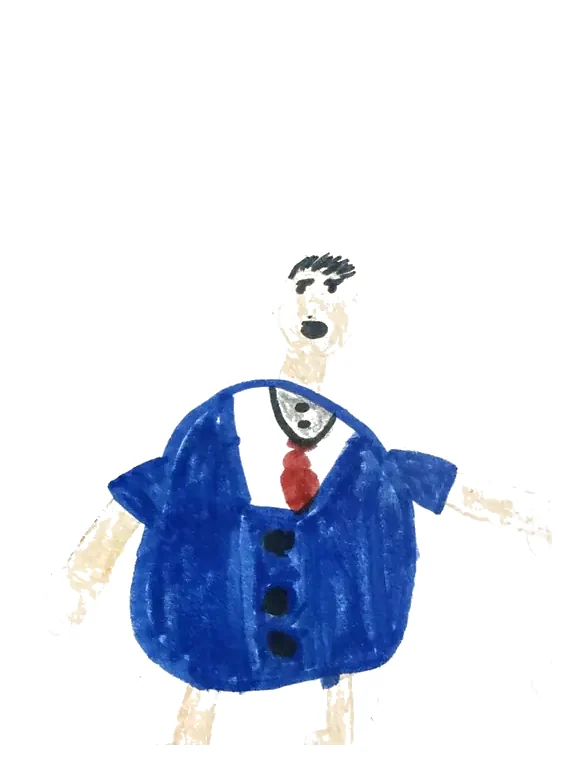
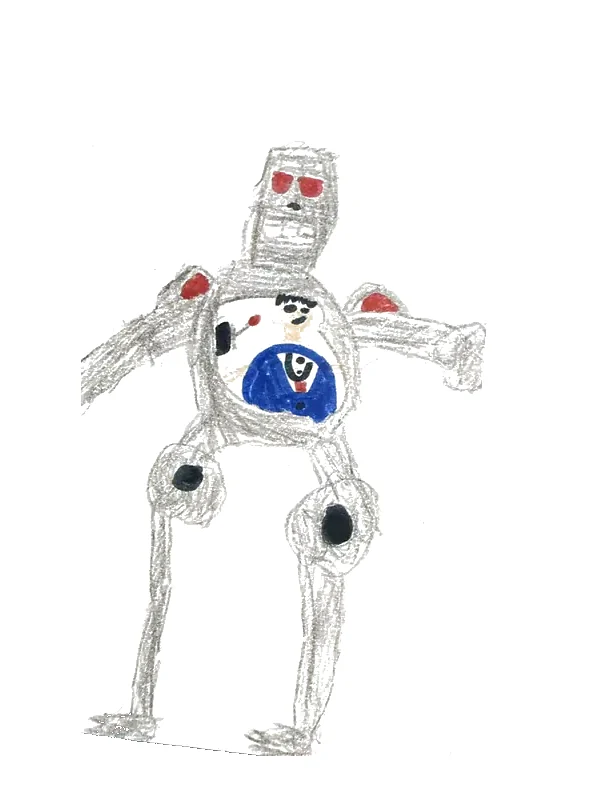
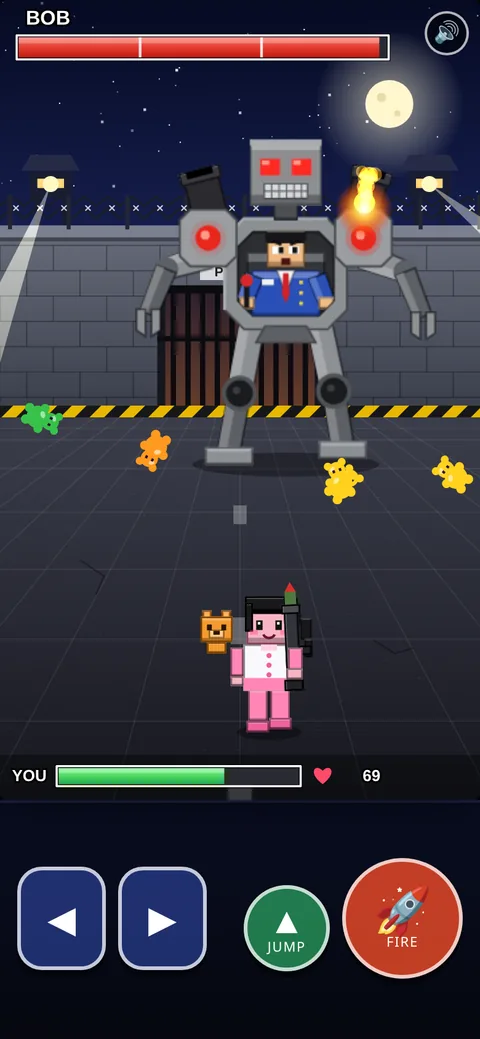
Want to see what this looks like? A kid named Nika drew a giant mech and Bob, the operator who pilots it. Those two drawings became a game you can play on fridgetoon.com.
In the demo, Bob pilots the Gummy Bear Mech. It fires flames from one shoulder and bouncy gummy bears from the other. The player dodges those attacks and blasts the mech with rockets. On a computer, use the arrow keys and Space. On a phone, use the on-screen buttons.
That demo was made as a test of what FridgeToon can do. Your game is built around your own kid's drawings and ideas.
What it costs, and how long it takes
Character, $9.99. This is a try-it-out option, not a playable game. FridgeToon turns your kid's drawing into a mockup image of their character and emails it to you, within 24 hours after payment clears and the form is approved. Character does not include changes after delivery. The in-game character will look different if you later get a FridgeToon game. If you upgrade from the link in that email, your $9.99 goes toward the game.
Your Own Game, $59. One game type with your kid's characters, a title screen, sound effects, a win screen, and an icon for the home screen. It includes 1 change within 14 days of delivery. It takes about 2–3 days after payment clears and the form is approved.
Big Game, $159. More levels, a boss, and their own story, with 3 changes within 30 days of delivery. It takes about 3–5 days after payment clears and the form is approved.
Those times are estimates, not a guarantee, and they start after payment clears and the form is approved.
You pay when you send the order form, through Stripe's secure checkout. FridgeToon never sees your card number. Every order is reviewed after payment. If FridgeToon can't make the game, you get a full refund. You can also request a refund within 30 days of purchase.
What FridgeToon can't make
These are small, fun games, and it's better to be clear up front. FridgeToon can't make:
- Online multiplayer, or play with friends over the internet
- Chat
- In-game purchases
- Huge open worlds
- Realistic 3D, or a version for a game console
- Copies of existing characters, like Mario or Fortnite
- Unlimited changes
- Graphic or realistic violence
Share it in the Arcade, or keep it private
Every game is emailed to the family as a private link, whether or not you share it. A parent can also opt in to share it in the FridgeToon Arcade, a free public hub of games made from kids' drawings. The Arcade uses character names only, never a child's real name, and there is no chat. You can play two games there now: Gummy Bear Mech and Chip Runner. In Chip Runner, Chip skates across the train roofs, grabbing coins and dodging barriers, to stay ahead of giant fluffy Tim.
Ready to try it?
Grab the drawings off the fridge, take a few clear photos, and tell us the story together.
Turn a drawing into a game at fridgetoon.com
Questions? Email hello@fridgetoon.com.